


.png)
Chemistry is hard. Whether you're planning a synthesis, predicting how a molecule will behave, or identifying a promising drug lead, you need to navigate databases, predict properties, search literature, and make sense of it all.
Molecules is our chemistry agent that gives you one place to do all of this. It builds on ChemCrow, one of the first tool-using chemistry agents, and takes those ideas much further .It combines language models with over 30 specialized chemistry tools ranging from retrosynthesis planners and toxicity predictors to chemical database navigation. You ask a chemistry question, and Molecules figures out which tools to use, reasons about the results, and returns answers grounded in real chemical data. Molecules are designed for generating or analyzing one, or a few, molecules with specific properties. Consider looking to Edison Analysis to analyze a large set of molecules.
We first introduced Molecules in May 2025 as part of our agent platform. Since then, we’ve made major advances in its reliability, reasoning ability, and tool coordination, making it significantly more capable for real-world chemical research.
What can Molecules do?
Molecules can calculate molecular properties like weight and formula, predict ADMET properties for drug development, and assess how easy a molecule is to synthesize. It plans retrosynthesis routes, predicts reaction outcomes, and calculates reaction thermodynamics.
For safety work, Molecules can check GHS classifications, retrieve LD50 toxicity values, screen for controlled substances, and run comprehensive toxicity predictions. For drug discovery, it can search ChEMBL for known compounds that bind to receptors, analyze drug development phases, retrieve bioactivity data, and assess side effect profiles.
Molecules is also integrated with Literature, providing evidence-backed answers for chemistry questions, and it can generate molecules with specific properties using our ether0 model, released earlier this year. Currently, Molecules is the top performing chemistry agent on the ether0 benchmark, a set of specialized chemistry knowledge questions.
Among the improvements, we have:
1. Enhanced Literature Search Integration
Initially, Molecules primarily relied on its cheminformatics tools for chemical space exploration.
By integrating Literature, our general-purpose literature agent, Molecules can now draw on scientific publications to address theoretical chemistry questions, identify recent synthetic methodologies, and surface emerging research trends.
2. Improved Tool Selection & Safety Systems
Enhanced Tool Descriptions: All tool descriptions have been revised to provide explicit guidance on their usage, scope, and limitations. This significantly reduces incorrect tool selection and improves the accuracy of Molecules' responses.
Safety Filtering: A comprehensive safety system has been implemented to help Molecules identify and refuse unsafe queries related to controlled substances or other prohibited applications. This ensures responsible use of Molecules’ powerful capabilities while maintaining full performance on legitimate chemistry research.
3. Expanded Toolset
ChEMBL Integration for Drug Discovery: Enhanced integration with the ChEMBL database enables drug repurposing analysis and side effect assessment. Molecules can now search for similar molecules, analyze drug development phases, retrieve detailed bioactivity data, and assess side effect frequencies across drugs.
PubChem Safety Data: Direct integration with PubChem provides access to GHS (Globally Harmonized System) safety classifications, LD50 toxicity values, and chemical weapons screening capabilities, enabling comprehensive safety assessments for any molecule.
Chemspace Integration: New integration with Chemspace’s small molecules and biologics databases allows Molecules to provide pricing information and identify purchasing sources for chemical reactants, making synthesis planning more practical and cost-effective.
AIZynthFinder for Retrosynthesis: Improved retrosynthesis planning powered by aizynthfinder provides more reliable multi-step synthesis routes with better template matching and route optimization.
Performance & Benchmarking
To validate Molecules' improvements, we evaluated its performance across multiple chemistry and general science benchmarks. Our hypothesis was that integrating literature search capabilities and the ether0 model would improve Molecules’ ability to answer general chemistry questions while maintaining or improving performance on specialized cheminformatics tasks.
Benchmark Results
Molecules demonstrates strong performance across diverse specialized and general chemistry benchmarks.
On the ether0 benchmark, which focuses on specialized chemistry knowledge, Molecules shows improved performance compared to agents without cheminformatics capabilities, highlighting the value of its comprehensive toolset. We show that when using tools to support question answering, Molecules outperforms our reasoning model trained for these tasks, ether0 – increasing accuracy from 43.7% to 60.2% overall ether0 tasks.

The ether0 benchmark is composed of multiple tasks; by investigating the performance per task, we can better identify Molecules’ capabilities and caveats. We see substantial improvement in tasks such as naming molecules and navigating different molecular representations.
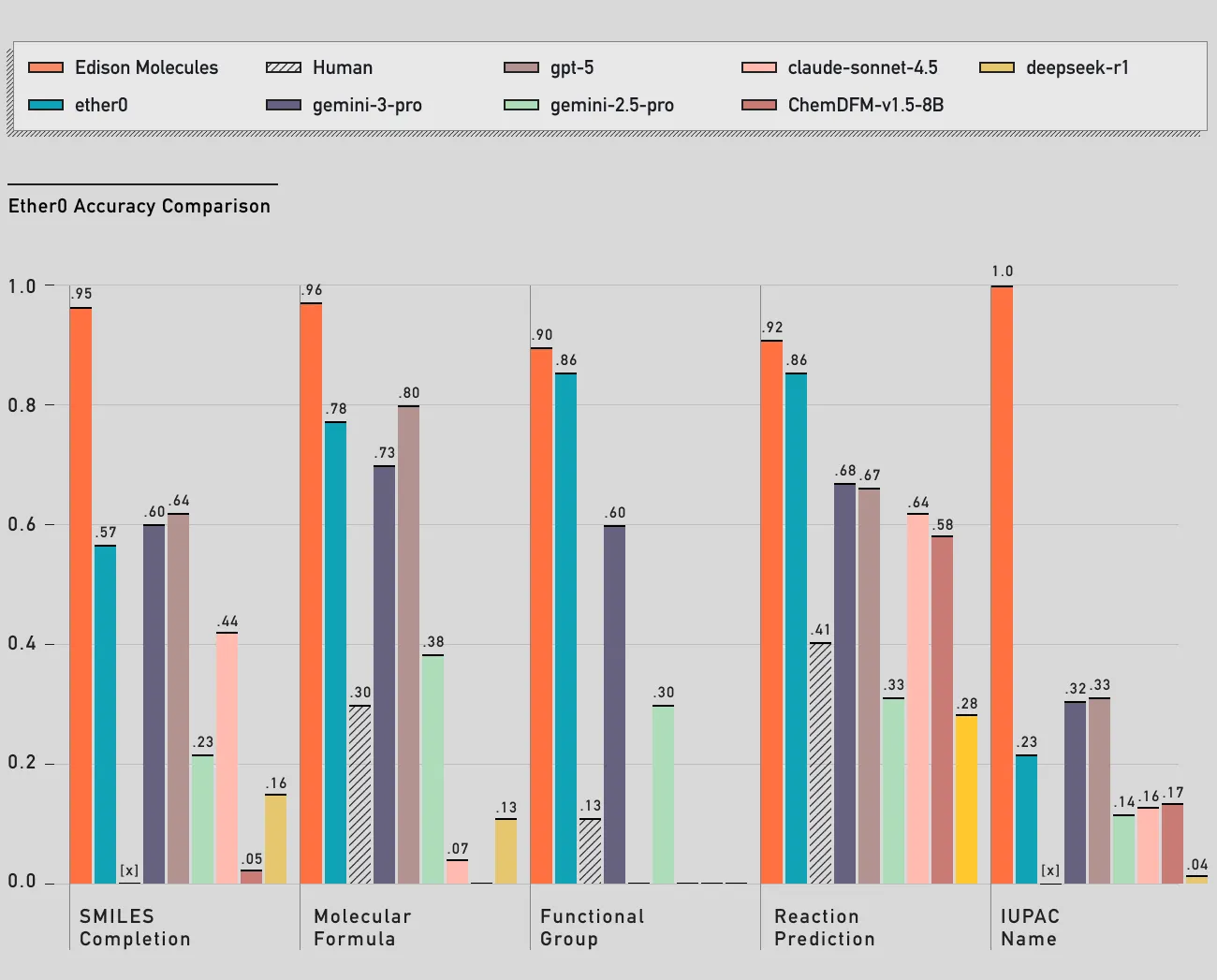
These results validate that Molecules successfully bridges the gap between general chemistry knowledge and specialized computational chemistry, making it a versatile tool for diverse chemistry applications.
Performance analysis
To illustrate how Molecules performs in realistic research settings, we highlight a typical use case. In this example, Molecules is tasked with finding a retrosynthesis route for a target molecule using commercially available reactants.
We then ask it to provide an estimated total cost for the reactants and, finally, to decide whether it’s cheaper to synthesize the target molecule or simply buy it.
The video below demonstrates this example in practice, offering a clear look at how Molecules operates in a real research workflow.
Specifically, we prompt Molecules with: “Propose a viable retrosynthesis route to produce caffeine starting from purchasable precursors. Also, give me an estimated total price for the reactants and search the literature for the reaction yield of each step. Finally, please write a report with all the findings and a conclusion on whether it's cheaper to synthesize or purchase 10g of the target molecule. Remember to take the reaction stoichiometry into account when calculating the synthesis cost.”
As discussed in the guidelines below, better performance is observed when detailed, unambiguous queries are sent to Molecules. The full trajectory is available in this link to our platform.
Molecules’ first step is to make a plan to guide the trajectory to fulfill the user’s request.
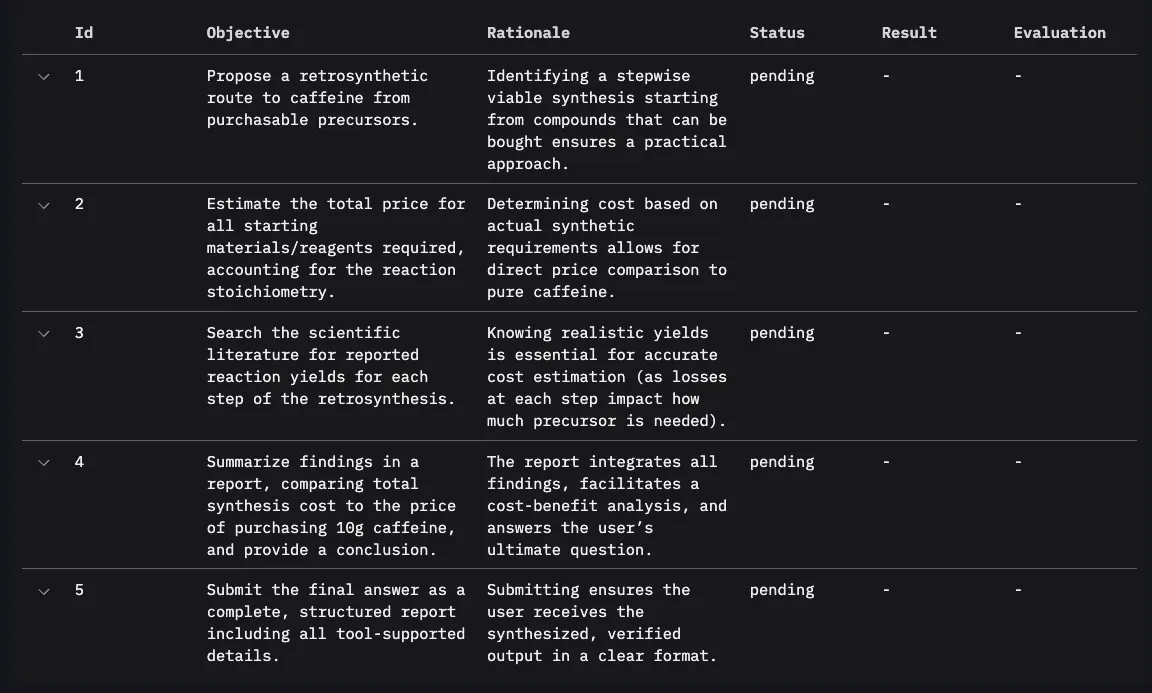
To complete the first objective, Molecules used its retrosynthesis tool. This tool is powered by aizynthfinder, an algorithm based on Monte-Carlo tree search that breaks the target molecule down into fragments into purchasable precursors using USPTO template reactions for retrosyntheses and ZINC as the stock database.
Given that caffeine is a well-known molecule with well-known precursors, Molecules’ retrosynthesis tool finds a one-step reaction with commercially available precursors. Notice that in a realistic scenario, this tool could return the entire retrosynthesis plan as multiple reactions.

With the first goal accomplished, Molecules start addressing the second step in the plan: estimating the total price for reactants and products.
Molecules starts by calculating the molecular weight of each component. We required it to take stoichiometry and the reaction yield into account. Hence, it needs to design the excess of reactants in mol units.
In the sequence, it searches for the price for each component. This is achieved by integrating Molecules with Chemspace. Chemspace provides a convenient API to request small molecules and biologic pricing.

The tool used to request pricing then returns the cheapest offers found with a convenient link to the vendor’s page. This concludes the second goal in the plan.
In the sequence, Molecules uses Literature to find scientific studies reporting the average yield for the reaction being considered. As can be seen on step 18 of the trajectory, the literature search didn’t return a definitive yield for the reaction. But endorsed that this is a common reaction to produce caffeine and lists examples of methylation reactions with large yield. Molecules then decides to be conservative and assumes a yield of 70%, fulfilling the third step in our plan.
The next step is to design the amount of reactant needed to produce 10g of caffeine and evaluate whether it's cheaper to produce caffeine or just buy it. The stoichiometry calculation takes place from step 20 to 28 where Molecules performs: (1) calculates how many moles of caffeine are required to synthesize 10g of product assuming a yield of 70%; (2) calculates how many grams of each reactant will be needed; (3) multiplies the available packs of reactants available in Chemspace to achieve the minimum amount of reactants needed; (4) checks the price of buying 10g of caffeine.
Molecules then writes a detailed report as the final answer and concludes the trajectory after completing all plan goals.

The final report is available on the trajectory webpage.
How to use Molecules
Be specific.
Molecules works best when molecular inputs and desired outputs are specified clearly.
When asking about molecules, provide SMILES strings, CAS numbers, IUPAC names, or molecular formulas explicitly.
Although Molecules can work with multiple representation types, it needs unambiguous molecular representations to reason effectively.
Similarly, the query itself should be as clear as possible, whether it's a synthesis route, a molecular property prediction, a safety assessment, or something else.
Molecules supports a wide range of chemistry workflows, so specifying exactly what you need helps it select the right tools and provide the most relevant results.
Provide context.
For reactions, use SMILES format like “reactants>reagents>products”. If you're working on a specific application like drug development or research synthesis, include that context so that Molecules can choose appropriate tools and consider relevant safety aspects. The more specific and well-structured your query, the better Molecules can help you.
For a complete guideline and examples on how to maximize Molecules' performance, please refer to our usage guidelines.
Try Molecules
Molecules is available on our platform under the Molecules tab. You can use it to plan syntheses, design molecules, assess safety, and answer chemistry questions. If you want to be part of our mission of accelerating scientific discovery, consider applying at Edison Scientific!